
Maya’s photo-printing story continues with DPoP. This time, a copied token needs a key.
Maya is still choosing photos for her family album. Album Printer has connected to her cloud photo account, and the thumbnails are on her phone.
In the PKCE story, an attacker copied the code returning through her browser. That code was not enough: the account service also required the verifier the app had kept for that attempt.
Then a different value leaked. An unsafe troubleshooting log at the photo API recorded the app’s bearer access token. The attacker copied it and requested Maya’s photos directly. No code exchange. No verifier. If the token was still valid for that API and permission, and no other control blocked the request, it could work.
The team fixes the logging defect. But the incident leaves a question: if a token leaks somewhere else tomorrow, can the photo API require something the thief does not have?
What is DPoP, and why does it help?
DPoP stands for Demonstrating Proof of Possession. It lets an OAuth client obtain an access token bound to a public key, then prove possession of the matching private key when using that token. The API requires the token and a signed proof for the request.[1]
For Album Printer, the extra thing is a private signing key kept by the app. Copying the access token does not reveal that key. The attacker cannot use their own key instead, because the service has already attached the token to Album Printer’s public key.
The token says what access Maya approved. The proof shows that this request was signed with the key that token belongs to.
The change happens in two places. The account service binds the token when it issues it. The photo API enforces that binding when the token is used. Adding a header on the client alone cannot provide this protection.
Do we keep PKCE?
Yes. PKCE protects the authorization-code exchange. DPoP adds a key requirement to token use. In this story we keep PKCE and obtain a new DPoP-bound access token. The bearer token from the earlier incident remains a bearer token until it expires or is revoked; changing a request header cannot retrofit a key binding.[2]
| Protection | Prepared by the app | Checked by the service | What it adds |
|---|---|---|---|
| PKCE | Fresh verifier and S256 challenge for each authorization attempt. | Account service compares the received verifier with the challenge linked to the code. | A copied code alone cannot obtain the token. |
| DPoP | Signing key, plus a fresh proof for each relevant request. | Account service binds the token; photo API checks proof and binding. | A copied bound token alone cannot request photos. |
First, give the app a key
Before we follow Maya’s next connection, separate the app’s configuration from the values it creates while running. They have different jobs and different lifetimes.
1. Keep the existing app registration
The developer has already registered Album Printer with the account service. Its public identifier is album-printer-mobile. Its allowed return address is com.example.albumprinter:/oauth/callback. Maya does not register the app, and this configuration is not recreated for every sign-in.
The identifier names the registration. It is not a password or proof that a caller is the legitimate app. This is a mobile public client, so our flow does not depend on a shared secret hidden in every installed copy. Registration alone gives the app no access to Maya’s photos.[3]
2. Check the account service and photo API support DPoP
The developer confirms that the account service can issue DPoP-bound access tokens and that the photo API validates them. Authorization-server metadata can advertise supported signing algorithms through dpop_signing_alg_values_supported. That metadata does not, by itself, establish the API’s support.
We use ES256 with a P-256 key for the example. A real deployment chooses an asymmetric algorithm supported and accepted by its services. Album Printer is configured to require a DPoP-bound access token for this photo flow; it checks the returned token_type rather than assuming its proof was honored.
A registration can also set dpop_bound_access_tokens: true, which tells a supporting account service to reject this client’s token requests if the DPoP header is missing. That setting does not, by itself, establish API enforcement. The specification permits compatibility with legacy bearer-only resources; those resources do not provide the key-binding protection described here.
3. Create a key pair locally
This installation of Album Printer generates two related keys using the platform’s cryptographic API. The private key signs proofs and stays in protected app storage. The public key lets the services verify those signatures. It can travel with each proof.
Maya does not create, memorize, or type either key. The developer must not ship one private key shared by every installed copy. DPoP does not mandate one universal key lifetime; using an installation-held key is the design choice in this story.
4. Keep the key for the tokens bound to it
The app saves a reference to the signing key with each token issued for it. It uses that same key for subsequent API proofs. It creates a new proof for each request; it does not create a new key for each request.
If it loses the key, it cannot use those bound tokens. Changing to a new key does not update existing bindings automatically. Plan recovery or reauthorization through the provider’s supported mechanism. Prefer protected, non-exportable key storage when the platform supports it, while remembering that hostile code may still be able to ask the app to sign.
The key is not the PKCE verifier. The verifier belongs to one code exchange and is sent to the account service during that exchange. The private signing key remains local and is needed whenever its bound tokens are used.
Follow Maya’s request, from preparation to photos
The participants are the same as before: Album Printer, Maya’s browser, the account service, and the photo API. The developer appears during setup. The attacker appears in separate leak scenarios.
Choose 0. Give the app a key, then 1. Obtain a bound token and 2. Request Maya’s photos. The later chapters examine a copied token, a copied token and proof, and optional server nonces. Each message has an explanation and an inspector. The written transcript contains the same steps without animation.
Three different lifetimes
App settings: existing registration, client_id, and allowed redirect_uri.
Key: created locally for this app installation; retained for the tokens bound to it.
Fresh values: verifier and state per authorization attempt; a new signed proof with a unique jti for each request.
Choose a chapter. Select a message to read the explanation; “Inspect this message” shows the illustrative headers, body, or server check.
Who does what?
- Developer: registers the app and configures DPoP support.
- Printing app: Album Printer on Maya’s phone; holds the key and signs proofs.
- Browser: takes Maya to the account service and returns the code.
- Account service: approves access and issues the bound token.
- Photo API: validates token and proof before serving photos.
- Attacker: copies credentials in separate fictional leak scenarios.
App registration already exists from the PKCE story. DPoP support and the app-held key are additional preparation, not permission to read Maya’s photos.
The developer checks both services support DPoP.
The account service must issue bound tokens, and the photo API must enforce their binding. A proof header alone cannot upgrade a service that ignores it.
Illustration only: no sign-in, signing, or network request occurs. Angle-bracket proof placeholders are not valid JWTs. Fixed values are teaching fixtures. Attack chapters are independent scenarios and do not reuse a consumed code. Nonces and replay-cache assumptions are stated per chapter. DPoP specification.
Read the full sequence without animation
0. Give the app a key
App registration already exists from the PKCE story. DPoP support and the app-held key are additional preparation, not permission to read Maya’s photos.
- The developer checks both services support DPoP. The account service must issue bound tokens, and the photo API must enforce their binding. A proof header alone cannot upgrade a service that ignores it.
- The existing app registration stays in place. Album Printer uses its public client_id and allowed return address. Registration identifies the app and restricts redirects; it does not grant access to Maya’s photos.
- This app installation creates its signing key. In this story the app generates a P-256 key pair locally. The private key signs proofs. The public key can be shared. This is separate from the fresh PKCE verifier.
- The app keeps the private key available. The key can outlive one request or one authorization attempt. Tokens issued for it require the same key. A new proof, not a new key, is made for each request.
1. Obtain a bound token
A fresh authorization attempt, replayed with PKCE and DPoP. This chapter uses no server nonce; chapter 5 shows the optional nonce exchange. Checks are explanatory, not a mandated internal order.
- The app prepares PKCE for this attempt. It saves a fresh random verifier and calculates its S256 challenge. Only the challenge goes to the authorization endpoint.
- The app labels its pending attempt. It creates a separate unpredictable state value and saves it alongside this attempt’s verifier. Our readable state is only a demonstration label.
- The app opens Maya’s external browser. The request names the registered app, allowed return address, requested permission, challenge, S256 method, and state. Neither the verifier nor private key goes into this URL.
- The browser delivers the authorization request. The browser sends the URL to accounts.example.com. It carries values prepared by the app; it does not generate the verifier or signing key.
- The service checks the existing registration. It finds the app using client_id and checks the allowed redirect_uri, flow, and requested permissions. An invalid redirect must not receive a redirect response.
- Maya approves photo-reading access. The photo service handles her sign-in and consent in its browser page. Album Printer never receives her photo-account password.
- The service creates a short-lived code. It links the code to the challenge, S256 method, app, return address, and approved access. In this base flow no dpop_jkt was supplied, so the code is not yet bound to a DPoP key.
- The service returns the code through the browser. The redirect contains the temporary code and unchanged state. It contains no access token and no DPoP proof.
- The browser and phone return to Album Printer. The registered callback carries the code and state into the app. This handoff is distinct from the app’s later HTTPS token request.
- The app checks its saved state. If the returned value does not match this pending attempt, the app stops. A match lets it retrieve that attempt’s verifier and chosen key reference.
- The app prepares a proof for the token endpoint. The JWT header contains the public key, typ dpop+jwt, and supported asymmetric algorithm. Its claims name POST and the token endpoint, with a fresh jti and current iat. There is no API access token to hash yet.
- The app signs the proof locally. The private key signs the encoded JWT header and payload. The proof reveals the public key and signature, not the private key. It is a signed object, not encrypted.
- The app makes the direct token request. It posts the code, verifier, client_id, and same redirect_uri to /token. The signed proof goes in the DPoP HTTP header. The browser does not forward this exchange.
- The service checks the OAuth exchange. The code must be valid, unexpired, and not already redeemed successfully. The client_id must match its app, and redirect_uri must exactly match the original request. Required client authentication must also pass where applicable.
- The service verifies the saved PKCE link. It hashes the received verifier using S256 and compares the result with the challenge linked to this code. A missing, invalid, or mismatching verifier prevents token issuance.
- The service validates the DPoP proof. It requires one well-formed proof, all required fields, typ dpop+jwt, an allowed asymmetric algorithm, and a public-only JWK. It verifies the signature using that public key.
- The service checks this proof belongs here. The proof must describe this POST to the token endpoint and meet the server’s freshness policy. htu excludes query and fragment. If a nonce had been supplied, its nonce policy would also apply.
- The service records the key binding. Only after the required checks pass does it associate the new access token with this public key. The API must obtain that binding from trusted token validation or introspection, not from a claim made only by the caller.
- The successful exchange consumes the code. The service completes one-time redemption so concurrent requests cannot both redeem it successfully. This story does not promise that a failed attempt leaves a code available for retry.
- The app receives its new bound token. The token is delivered in the direct response to the app. token_type DPoP signals its binding. This is a newly issued token; the old bearer token has not changed.
- The app checks and saves the result. Album Printer requires a DPoP access token for this flow. It saves the token with the matching key reference and uses a fresh API proof next.
2. Request Maya’s photos
The app has a valid DPoP-bound access token. The API validates ordinary access and DPoP. This deployment also keeps a replay cache; the standard does not require every deployment to implement that cache.
- The app starts a new proof for this API request. It uses the same signing key, with a new jti, current iat, GET, and the photo API URI. The earlier POST /token proof cannot serve as this proof.
- The app adds ath to the API proof. ath is the unpadded base64url-encoded SHA-256 hash of the ASCII access-token value. It links this signed proof to the exact token being presented.
- The app signs the API claims. The signature covers the header and claims, including ath. The private key remains local. A JWT access token, if used, has its own issuer signature; these are separate signatures.
- The app sends two different headers. Authorization carries the access token using the DPoP scheme. The separate DPoP header carries the signed proof. The PKCE verifier is absent.
- The API checks ordinary access first in our illustration. It validates the token using the issuer’s trusted mechanism, including expiration, intended resource, and photos.read permission. A correct proof cannot make an invalid token valid.
- The API checks the proof and this request. It checks the JWT format, required claims, type, algorithm, public-only key, signature, GET method, matching URI, freshness, and any required server nonce.
- The API independently hashes the received token. The calculated hash must equal ath in the signed proof. Supplying a hash for a different token fails this check.
- The API compares public-key thumbprints. It calculates the thumbprint of the proof’s public JWK and compares it with the token’s trusted binding. A valid signature from someone else’s key is insufficient.
- This deployment prevents a second use of the proof. After validation, it atomically checks and records the proof identifier in a cache scoped to the key and target URI for its acceptance window. All replicas enforcing this boundary share that state.
- Maya’s thumbnails appear. The API returns the photos only after ordinary access checks and all required DPoP checks succeed. The app still needs to fetch each later protected resource with its own appropriate proof.
3. Copy only the token
An independent successful exchange has issued a fresh bound token. The attacker copies only that token, not the app’s private key or a usable proof. The API enforces binding without bearer downgrade.
- The legitimate app sends its photo request. PKCE and DPoP already passed at the account service. The app presents the new bound token with a matching proof.
- The same logging mistake leaks a token again. An unsafe troubleshooting log records Authorization. The attacker copies the access token, while the private key stays with the app. The log leak is still a defect.
- The attacker tries a key they own. They can make a syntactically correct proof with the right method, URI, time, and token hash. Its signature can verify perfectly against their own public key.
- The attacker sends the copied token. They go straight to the API. No authorization code or PKCE verifier is involved in this request.
- The binding check fails. The proof’s public key does not match the key attached to the token. A valid signature alone is not enough.
- The copied token is not enough. This example uses invalid_token for the failed key binding. Other proof-validation failures can use invalid_dpop_proof in a DPoP challenge.
4. Copy token + proof
A separate request was already accepted and its proof identifier recorded. The attacker replays an exact copy within its freshness window. This chapter assumes the API has atomic replay tracking across replicas.
- The API accepts the legitimate request once. The proof matches the token, key, method, URI, and freshness policy. The API records its jti before returning photos.
- The attacker now copies the complete credentials. The log exposes both Authorization and DPoP. The attacker lacks the private key but has a signed proof that describes the same endpoint.
- The attacker repeats the same request quickly. The method, URI, token hash, key binding, and timestamp may still pass. The attacker is replaying a signature, not making a new one.
- The replay cache detects the duplicate. This key and target URI already used that proof identifier. The API rejects it even though the cryptographic signature remains valid.
- The replayed proof is refused. Without effective duplicate tracking, a same-endpoint replay can succeed while the proof is fresh. If an attacker races the legitimate request, first-use tracking cannot guarantee who wins.
5. Add server nonces
Optional nonce policies, shown in a separate fresh exchange. Account-service and photo-API nonces are independent. The first rejected exchange here has not completed a successful code redemption.
- The app sends its first token request. It has not yet received an account-service nonce. It sends a fresh proof and its ordinary code-exchange body.
- The account service asks for its nonce. It returns use_dpop_nonce and DPoP-Nonce. It does not issue a token. The app must sign a fresh proof containing this nonce before retrying.
- The app signs the token proof again. It uses the same key and token-endpoint method and URI, with a new jti, current iat, and the account-service nonce. The signature must be new because the claims changed.
- The app retries with the fresh signed proof. The service validates its nonce and all ordinary OAuth, PKCE, and DPoP checks. A client must follow the provider’s retry behavior; this illustrated challenge does not consume the code.
- The exchange succeeds once. The service issues a DPoP-bound token and consumes the authorization code on successful redemption. It may also supply a newer nonce for later token requests.
- The app requests photos with a fresh API proof. It uses GET, the photo API URI, and ath for the token. The account-service nonce is not the photo API’s nonce.
- The photo API asks for its own nonce. Its challenge uses HTTP 401 and WWW-Authenticate: DPoP, alongside DPoP-Nonce. This differs from the token endpoint’s HTTP 400 JSON error.
- The app signs a new photo-API proof. It keeps the same key and token, recalculates the appropriate claims, and includes the API’s nonce. It does not edit the old signed JWT or substitute the account-service nonce.
- The app sends the new proof. The API checks its nonce plus all token and proof checks. Nonces can be reused while a server accepts them; fresh jti values and replay tracking remain separate controls.
- The API accepts the nonce-bearing request. Maya sees her pictures. Both servers can update their own nonce values, including on successful responses, and the app keeps their policies separate.
How does the app obtain the DPoP-bound token?
Maya taps “Connect your photo account” again. Here is one fresh authorization attempt, with the additional DPoP steps visible. This base flow has no server nonce and does not use the optional dpop_jkt authorization-request parameter; we will return to both later.
Prepare PKCE alongside the DPoP key
The app prepares PKCE for this attempt. It saves a fresh random verifier and calculates its S256 challenge. Only the challenge goes to the authorization endpoint.
The app labels its pending attempt. It creates a separate unpredictable state value and saves it alongside this attempt’s verifier. Our readable state is only a demonstration label.
The app opens Maya’s external browser. The request names the registered app, allowed return address, requested permission, challenge, S256 method, and state. Neither the verifier nor private key goes into this URL.
Let Maya approve access in the browser
The browser delivers the authorization request. The browser sends the URL to accounts.example.com. It carries values prepared by the app; it does not generate the verifier or signing key.
The service checks the existing registration. It finds the app using client_id and checks the allowed redirect_uri, flow, and requested permissions. An invalid redirect must not receive a redirect response.
Maya approves photo-reading access. The photo service handles her sign-in and consent in its browser page. Album Printer never receives her photo-account password.
The service creates a short-lived code. It links the code to the challenge, S256 method, app, return address, and approved access. In this base flow no dpop_jkt was supplied, so the code is not yet bound to a DPoP key.
The service returns the code through the browser. The redirect contains the temporary code and unchanged state. It contains no access token and no DPoP proof.
The browser and phone return to Album Printer. The registered callback carries the code and state into the app. This handoff is distinct from the app’s later HTTPS token request.
The app checks its saved state. If the returned value does not match this pending attempt, the app stops. A match lets it retrieve that attempt’s verifier and chosen key reference.
Sign and send the DPoP token request
The app prepares a proof for the token endpoint. The JWT header contains the public key, typ dpop+jwt, and supported asymmetric algorithm. Its claims name POST and the token endpoint, with a fresh jti and current iat. There is no API access token to hash yet.
The app signs the proof locally. The private key signs the encoded JWT header and payload. The proof reveals the public key and signature, not the private key. It is a signed object, not encrypted.
The app makes the direct token request. It posts the code, verifier, client_id, and same redirect_uri to /token. The signed proof goes in the DPoP HTTP header. The browser does not forward this exchange.
Check OAuth, PKCE, and DPoP
The service checks the OAuth exchange. The code must be valid, unexpired, and not already redeemed successfully. The client_id must match its app, and redirect_uri must exactly match the original request. Required client authentication must also pass where applicable.
The service verifies the saved PKCE link. It hashes the received verifier using S256 and compares the result with the challenge linked to this code. A missing, invalid, or mismatching verifier prevents token issuance.
The service validates the DPoP proof. It requires one well-formed proof, all required fields, typ dpop+jwt, an allowed asymmetric algorithm, and a public-only JWK. It verifies the signature using that public key.
The service checks this proof belongs here. The proof must describe this POST to the token endpoint and meet the server’s freshness policy. htu excludes query and fragment. If a nonce had been supplied, its nonce policy would also apply.
The service records the key binding. Only after the required checks pass does it associate the new access token with this public key. The API must obtain that binding from trusted token validation or introspection, not from a claim made only by the caller.
The successful exchange consumes the code. The service completes one-time redemption so concurrent requests cannot both redeem it successfully. This story does not promise that a failed attempt leaves a code available for retry.
Receive the DPoP-bound token
The app receives its new bound token. The token is delivered in the direct response to the app. token_type DPoP signals its binding. This is a newly issued token; the old bearer token has not changed.
The app checks and saves the result. Album Printer requires a DPoP access token for this flow. It saves the token with the matching key reference and uses a fresh API proof next.
What actually goes to the token endpoint?
There is one HTTPS request from the app to the account service. The form body carries the ordinary code-exchange parameters and PKCE verifier. The new HTTP header carries the DPoP proof. state has already been checked locally; it is not part of this token request.
POST /token HTTP/1.1
Host: accounts.example.com
Content-Type: application/x-www-form-urlencoded
DPoP: <new signed token-endpoint proof>

grant_type=authorization_code&client_id=album-printer-mobile&redirect_uri=com.example.albumprinter%3A%2Foauth%2Fcallback&code=demo-code-01&code_verifier=v20Pc6b0xsaZzUlnL-rEB01H6VRR49rmQqOwkJkR0hk
The angle-bracket value is a placeholder for a real signed JWT. All domains and credentials here are fictional. The published PKCE verifier and challenge form a complete matching pair, but real attempts require new unpredictable values.
The account service checks the ordinary OAuth exchange, PKCE, and DPoP before issuing the token. A PKCE failure prevents issuance even if the proof is valid. A proof failure prevents DPoP issuance even if the verifier matches. A correct proof is not client authentication and does not replace authentication for clients that are required to authenticate.
What comes back?
HTTP/1.1 200 OK
Content-Type: application/json
Cache-Control: no-store

{
  "access_token": "demo-dpop-access-token-01",
  "token_type": "DPoP",
  "expires_in": 900,
  "scope": "photos.read"
}
The important field for the app is token_type: "DPoP". It signals that this access token was bound to the key used in the proof. The app now has a token and the corresponding signing-key reference. Maya’s browser never carried this access token.
A server can choose to return a bearer access token instead under the specification. A client that requires bound access must detect that response and follow its failure policy. The security property in our story depends on a bound token actually being issued and the API enforcing it.
What is inside a DPoP proof?
A proof is a signed JWT: an encoded header, an encoded payload, and a signature. The header and claims are readable; signing does not encrypt them. The following is our own decoded teaching example for a photo request. The signature is omitted, and the fixed time and identifiers must be replaced in real requests.
Header:
{
  "typ": "dpop+jwt",
  "alg": "ES256",
  "jwk": {
    "kty": "EC",
    "crv": "P-256",
    "x": "SEg8Fn1aZsuaGot2m7cF2f6aJxYQxAyyOXl4fqW9o4g",
    "y": "M1pasBT4GC8mf4T-PxYfSyqjlEkQdkjE3dNJIWAgat0"
  }
}

Payload:
{
  "jti": "demo-api-proof-01",
  "htm": "GET",
  "htu": "https://photos.example.com/photos",
  "iat": 1791633600,
  "ath": "3REklZDlT4BIjGAo1F_luUw-0dIjzyZ26Vg9ji3voWU"
}| Field | Purpose |
|---|---|
typ | Identifies this as a DPoP proof: dpop+jwt. |
alg | An accepted asymmetric signing algorithm; our example uses ES256. Neither none nor a symmetric algorithm is acceptable. |
jwk | The public key used to verify the proof. It must not contain the private key. |
jti | A unique proof identifier, with negligible collision probability. Generate a fresh value for each proof. |
htm | The HTTP method for this request, such as GET or POST. |
htu | The target HTTP URI, excluding query and fragment. The server compares it with the actual request URI using appropriate normalization. |
iat | Proof creation time in Unix seconds. The server enforces its acceptable freshness window; a nonce can provide a server-managed time basis. |
ath | Required when a proof accompanies an access token to a protected resource: a hash of that exact token. It is not needed in this ordinary token request. |
nonce | Included when required after the receiving server supplies a DPoP nonce. That server checks it against its policy. |
Why are there two different fingerprints?
We now have two comparisons at the API. ath ties the signed proof to the token string in this request. cnf.jkt ties the token to the public key the issuer recorded. They answer different questions.
ath = base64url_without_padding(SHA256(ASCII(access_token)))

For demo-dpop-access-token-01:
3REklZDlT4BIjGAo1F_luUw-0dIjzyZ26Vg9ji3voWU

Token’s public-key binding:
{
  "cnf": {
    "jkt": "m-pQ99wINUSg0bgiCZjr9SmjCi5a1EV6msD2mutgb04"
  }
}
For the EC key shown above, jkt is calculated using the RFC 7638 canonical representation of the required public JWK members: crv, kty, x, and y, in lexicographic order, without extra whitespace. It is not the hash of an arbitrary formatted JWK or the private key.[4]
Anyone who copies the token can calculate its ath. Anyone who sees the public key can calculate its thumbprint. The secret is the private key needed to sign new proofs matching the token’s binding.
Does the access token have to be a JWT?
No. The proof is a JWT, but the access token can be a JWT or an opaque value. A JWT access token can carry a trusted cnf.jkt claim after issuer validation. For an opaque token, the API can obtain the binding through trusted token introspection or another issuer-supported validation mechanism. The metadata shown here is an illustration of the binding, not a promise that our readable token contains JSON.
The app signs the DPoP proof. The account service signs a JWT access token if that is its chosen token format. Verifying the app’s proof with its embedded public key does not establish that an access token was issued by the trusted account service.
How does the photo API validate DPoP?
Album Printer prepares a new proof for GET https://photos.example.com/photos, using the same key, a new identifier, current time, and the token hash. It sends:
GET /photos HTTP/1.1
Host: photos.example.com
Authorization: DPoP demo-dpop-access-token-01
DPoP: <new signed photo-API proof>
Authorization carries the token. The separate DPoP header carries the proof. Reusing the earlier token-endpoint proof fails because it describes POST to a different URI, and it lacks the required access-token hash for this API call.
DPoP validation at the photo API
The API checks ordinary access first in our illustration. It validates the token using the issuer’s trusted mechanism, including expiration, intended resource, and photos.read permission. A correct proof cannot make an invalid token valid.
The API checks the proof and this request. It checks the JWT format, required claims, type, algorithm, public-only key, signature, GET method, matching URI, freshness, and any required server nonce.
The API independently hashes the received token. The calculated hash must equal ath in the signed proof. Supplying a hash for a different token fails this check.
The API compares public-key thumbprints. It calculates the thumbprint of the proof’s public JWK and compares it with the token’s trusted binding. A valid signature from someone else’s key is insufficient.
This deployment prevents a second use of the proof. After validation, it atomically checks and records the proof identifier in a cache scoped to the key and target URI for its acceptance window. All replicas enforcing this boundary share that state.
Maya’s thumbnails appear. The API returns the photos only after ordinary access checks and all required DPoP checks succeed. The app still needs to fetch each later protected resource with its own appropriate proof.
The checks can be performed in a different order. Their result must be the same: access is denied unless all required checks pass. A deployment accepting both bearer and DPoP tokens must reject a DPoP-bound token presented as Bearer. Otherwise a thief could bypass the proof requirement simply by changing the scheme.
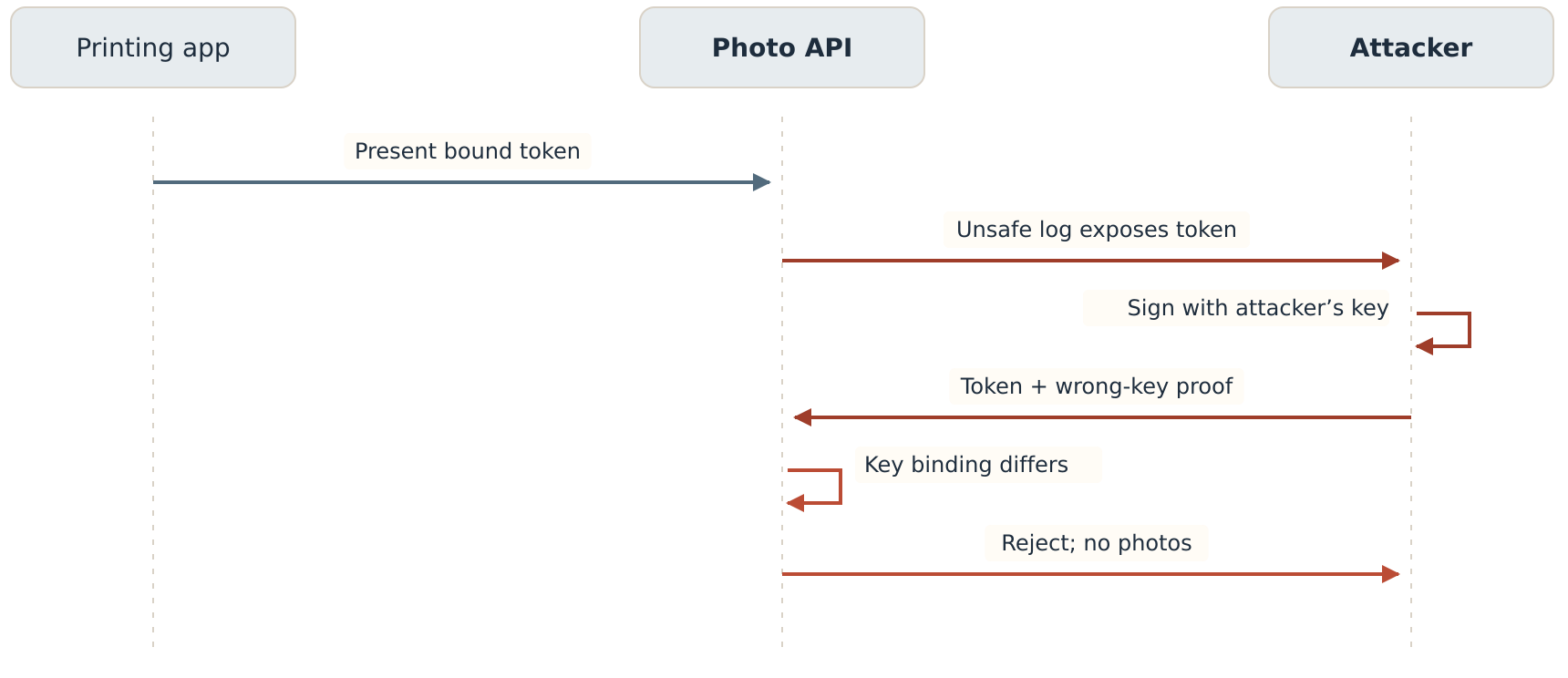
The attacker copies the token again
Replay the original logging incident with the newly bound token. The private key stays with Album Printer. The attacker copies only the access token.
Sending that token without a proof fails. Creating a proof with the attacker’s own key also fails, even if its signature, method, URI, time, and token hash are correct. The API calculates the public-key thumbprint from the proof and finds that it differs from the token’s trusted binding.
That is the check that changes the outcome for Maya. The thief possesses a token but cannot produce a new proof from the key it belongs to. DPoP reduces the damage from this leak; the team still removes sensitive logging and responds to exposed credentials.
What if the log contains the proof too?
This is a different attack. A proof is itself a signed credential. Someone who copies it does not need to create a signature in order to replay the same token and proof at the same method and URI.
The server must limit how long a proof can be accepted. It can also track jti values and reject repeated use. Our replay chapter assumes the legitimate request was already accepted, the identifier was recorded, and the attacker repeats it within the freshness window. The cache rejects the duplicate.
Without effective replay tracking, that same-endpoint replay can succeed while the proof is accepted. A distributed API needs an atomic check across replicas that share the acceptance boundary; separate per-process caches leave gaps. The cache must be scoped to the relevant key and target URI, and retained for the complete acceptance window.
Even with single-use tracking, a race has a limit: if the thief’s copied request arrives first, the server cannot infer from that request alone which sender deserved to win. Keeping proofs and tokens out of logs and protecting the transport remain necessary.
Why might a DPoP server ask for a nonce?
A nonce is a value the receiving server supplies for the app to include in its next signed proof. A recently issued, unpredictable value makes it harder to prepare usable proofs far ahead of time. It can also help the server enforce freshness using its own time basis.
Nonces are optional in the base protocol. Once a server supplies a DPoP nonce, the client must include the required nonce and the server must enforce that requirement. The app signs a fresh proof when retrying; it cannot change the claims of an old signed JWT without invalidating its signature.
| Receiving server | Challenge | App response |
|---|---|---|
| Account service, token endpoint | HTTP 400; JSON error: use_dpop_nonce; DPoP-Nonce response header. | New token-endpoint proof using the account service’s nonce, then a retry under its policy. |
| Photo API, protected resource | HTTP 401; WWW-Authenticate: DPoP error="use_dpop_nonce"; DPoP-Nonce response header. | New API proof using the photo API’s nonce and token hash, then retry. |
Keep the account-service and API nonce contexts separate. Neither value is OAuth state or an OpenID Connect nonce. A server may update its nonce on a successful response too, so the client must process nonce headers beyond errors.
A DPoP nonce need not be accepted only once. Servers can permit multiple proofs carrying the same nonce during its validity period. Fresh proof identifiers and duplicate tracking are still separate controls. “We enabled nonces” is not enough to claim every replay is impossible.
How do DPoP refresh tokens work?
If the account service issues a refresh token to this public client after a valid DPoP token request, that refresh token must be bound to the same public key. Refreshing requires a fresh token-endpoint proof signed with that key, and the service validates the binding before issuing another access token.
POST /token HTTP/1.1
Host: accounts.example.com
Content-Type: application/x-www-form-urlencoded
DPoP: <fresh proof signed with the refresh token’s bound key>

grant_type=refresh_token&client_id=album-printer-mobile&refresh_token=demo-refresh-token-01
This example is another token request, not a protected-resource call with an access token, so it does not require ath for the refresh token. Use POST, the token endpoint URI, a new jti, current iat, and the account-service nonce when required. Inspect the new response’s token_type too.
Refresh-token rotation and reuse detection can add protection; DPoP does not make every provider rotate refresh tokens automatically. RFC 9700 requires public-client refresh tokens to use sender-constraining or rotation to detect replay. For confidential clients, refresh tokens are already bound to the authenticated client; do not assume RFC 9449 mandates the same DPoP-key binding rule for them. Check the provider’s contract.[5]
What DPoP cannot promise
Does it sign the whole request?
No. The standard proof covers the method and URI, and includes the token hash for protected-resource access. It does not cover the request body, query parameters, fragment, or arbitrary headers. A proof for /photos?album=family uses https://photos.example.com/photos as htu. It does not cryptographically bind the value of album.
In Maya’s story the approved permission is photos.read. DPoP does not grant printing, uploading, deleting, or any other permission on its own. If a later workflow must bind an approval to exact transaction details, it needs an additional protocol or application mechanism designed for that purpose.
Can it replace HTTPS?
No. DPoP must be used with HTTPS. TLS protects the connection and authenticates the receiving server. DPoP neither encrypts the token nor makes it safe to send credentials to an untrusted destination.
Does it prove which app or device is calling?
It proves possession of the signing key for the relevant token. It does not establish the user’s identity, authenticate a client_id, attest a device, or prove that the app is healthy. Those require their own checks. Maya’s sign-in, OAuth permission, PKCE verifier, and DPoP proof remain different pieces.
What if someone controls the app?
The copied-token scenario assumes the attacker cannot use the private key. If malware controls the native app, or hostile script runs inside a browser client’s execution context, it may be able to invoke signing operations, steal an exportable key, or interfere with new authorization. A non-exportable key helps prevent key extraction; it does not stop code that can ask the key to sign. DPoP cannot guarantee security once that execution context is compromised.
The questions to ask before shipping
Can we bind the code to the key earlier?
Yes. RFC 9449 defines optional dpop_jkt in the authorization request. It carries the thumbprint of the public key the app intends to use. A supporting account service links that value to the code and rejects a token exchange whose proof key does not match.
Our base flow leaves it out to make the initial exchange easier to follow: the token’s DPoP binding is established at the token endpoint. Using the earlier code binding adds a check before someone with a redeemable code can choose a different key. Keep PKCE as well; this extension is not a reason to remove it.
What if a gateway sits in front of the API?
Choose where DPoP is validated and where its trusted result is enforced. A proxy rewriting scheme, host, port, or path can make the internal URI differ from the app’s htu. The validator needs a trusted representation of the original external URI and correct normalization. Do not trust arbitrary forwarding headers supplied by an attacker.
If the gateway validates the proof, downstream services need an authenticated, protected way to receive the validation result and token authorization context. Prevent routes that bypass that boundary. An ordinary forwarding gateway cannot create fresh app-key proofs unless it has access to that key, which changes the trust model.
What if a backend holds the OAuth tokens?
With a backend-for-frontend, the backend can be the OAuth client and DPoP key holder. It signs proofs on its own calls to the resource server. That protects that token boundary; it does not automatically bind the browser’s session cookie to the browser. Session security and CSRF protection still need separate design.
What changes in a browser client?
The key-holder may be JavaScript using Web Crypto rather than a native mobile app. It still needs compatible issuer and API support. For cross-origin calls, CORS must permit the DPoP request header and let the app read nonce and authentication challenge response headers, including DPoP-Nonce and WWW-Authenticate, where needed. Browser key storage, concurrency, retries, and untrusted-code risks deserve their own review.
Must every flow use state?
Our story keeps the explicit state check from the PKCE article because it makes the pending attempt visible. The state is separate from both DPoP and the verifier. Correctly implemented PKCE can also provide CSRF protection when the client ensures the authorization server supports it; this story does not claim a separate state value is mandatory in every conforming deployment.[5]
How should errors and retries work?
At the token endpoint, an invalid proof produces invalid_dpop_proof; a nonce challenge uses use_dpop_nonce. At the API, a DPoP authentication challenge can distinguish an invalid proof from a token with the wrong key binding. Neither case should silently fall back to bearer use for a bound token.
Create a fresh proof for each actual retry and use the latest applicable server nonce. Coordinate nonce updates and token/key references across concurrent requests. Bound retries should be limited. For requests with side effects, a fresh proof is not application-level idempotency: arrange duplicate-operation handling independently.
A small checklist for the team
- Require bound issuance for this flow and enforce the binding on every protected API route.
- Keep PKCE, ordinary token validation, scope and audience checks, and HTTPS.
- Use a supported asymmetric algorithm, public-only proof JWK, fresh proof identifiers, and a defined freshness window.
- Check method, external URI, token hash, key binding, and applicable nonce.
- Decide and test replay tracking across replicas; document the remaining first-arrival race.
- Keep private keys protected and retain the correct key reference for access and public-client refresh tokens.
- Test nonce challenges, concurrent requests, proxy rewriting, retries, key loss, and unexpected bearer responses.
- Exclude credentials from logs and address compromised client code separately.
Back to Maya’s album
Maya still taps “Connect your photo account.” She still approves photo-reading access on the photo service’s page. She still returns to Album Printer and sees her thumbnails.
Behind those familiar steps, the service now checks the PKCE verifier before releasing a token, records the token’s public-key binding, and requires a signed proof when the app requests photos. The copied code was not enough. Now the copied bound token is not enough either.
The family album is the same. The conditions for obtaining and using its photos are stronger.
Technical references
The story, explanations, and examples are original. These standards define the protocol rules.
- RFC 9449: OAuth DPoP — proof syntax and validation (§4), issuance and refresh (§5), binding (§6), API enforcement (§7), nonces (§8–9), earlier code binding (§10), and limitations (§11).
- RFC 7636: PKCE — verifier, S256 challenge, and exchange checks (§4).
- RFC 6749: OAuth 2.0 — public clients and registration (§2); authorization-code exchange (§4.1).
- RFC 7638: JWK Thumbprint — canonical public JWK representation and hashing (§3).
- RFC 9700: OAuth 2.0 Security Best Current Practice — PKCE and CSRF (§2.1.1), refresh-token protection (§4.14).
Leave a Reply